

Have you ever wanted to install WordPress on Heroku? Well, now you can with a simple buildpack developed by MChung.
Wait a second you say – isn’t Heroku for Ruby applications? Ah, you must have missed out on the Celadon Cedar stack which makes this much easier to do. You can, as a developer, install and run any language or choice if you’d like.
Tada!
It’ll use the following stack:
nginx-1.3.11– Nginx for serving web content. Built specifically for Heroku. See compile options.php-5.4.11– PHP-FPM for process management and APC for caching opcodes. See compile options.wordpress-3.5.1– Downloaded directly from wordpress.org.MySQL– ClearDB for the MySQL backend.Sendgrid– Sendgrid for the email backend.MemCachier– MemCachier for the memcached backend.
Get the fork here and then you’ll be on your way with this buildpack.
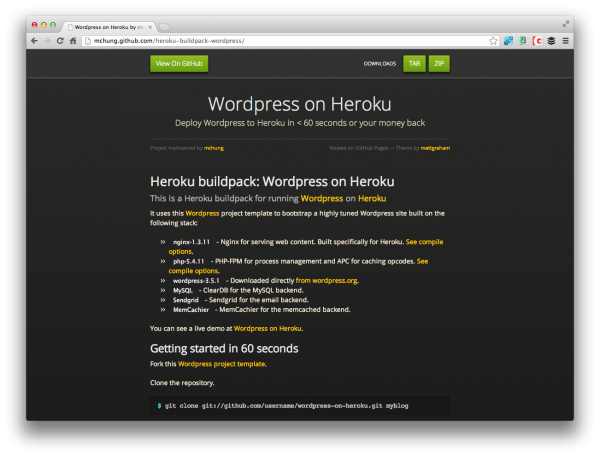
If you need the robust instructions you can head over to his stylized landing page for the project here as well.
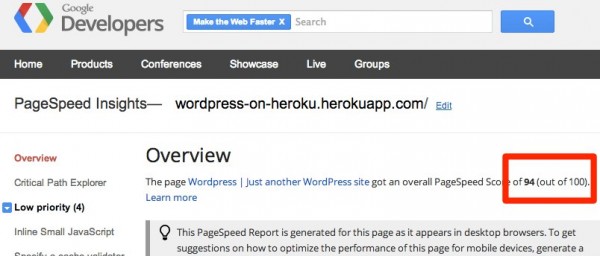
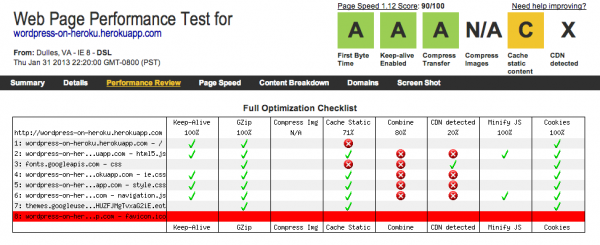
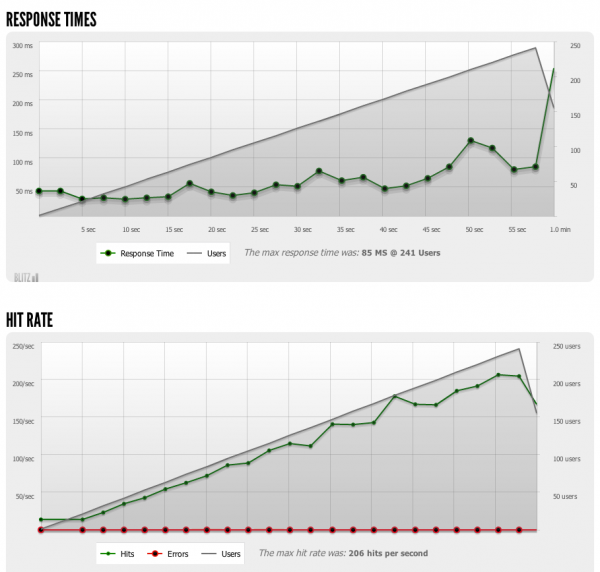
Thanks MChung for your service to the WordPress community! He’s looking to continue the work because there’s still much to do, especially with some of the performance benchmarks he’s seen:
Here’s on his list of To-dos:
- Automate vendor upgrades. Make it easy to keep in sync with latest Nginx, PHP, and WordPress.
- End-users shouldn’t be able to do things that aren’t supported on Heroku. Write plugins to hide everything.
- Integrate New Relic.
- CDN support.
- Combine CSS/JS files
Interested parties can fork and then connect with him!
5 Comments
Join the conversation